Cousin Chart
Read the name of any cousin relationship from degree and times removed, then print the chart or save it as CSV or PNG.
Recent
Your last 10 settings, saved only in this browser. Nothing is uploaded.
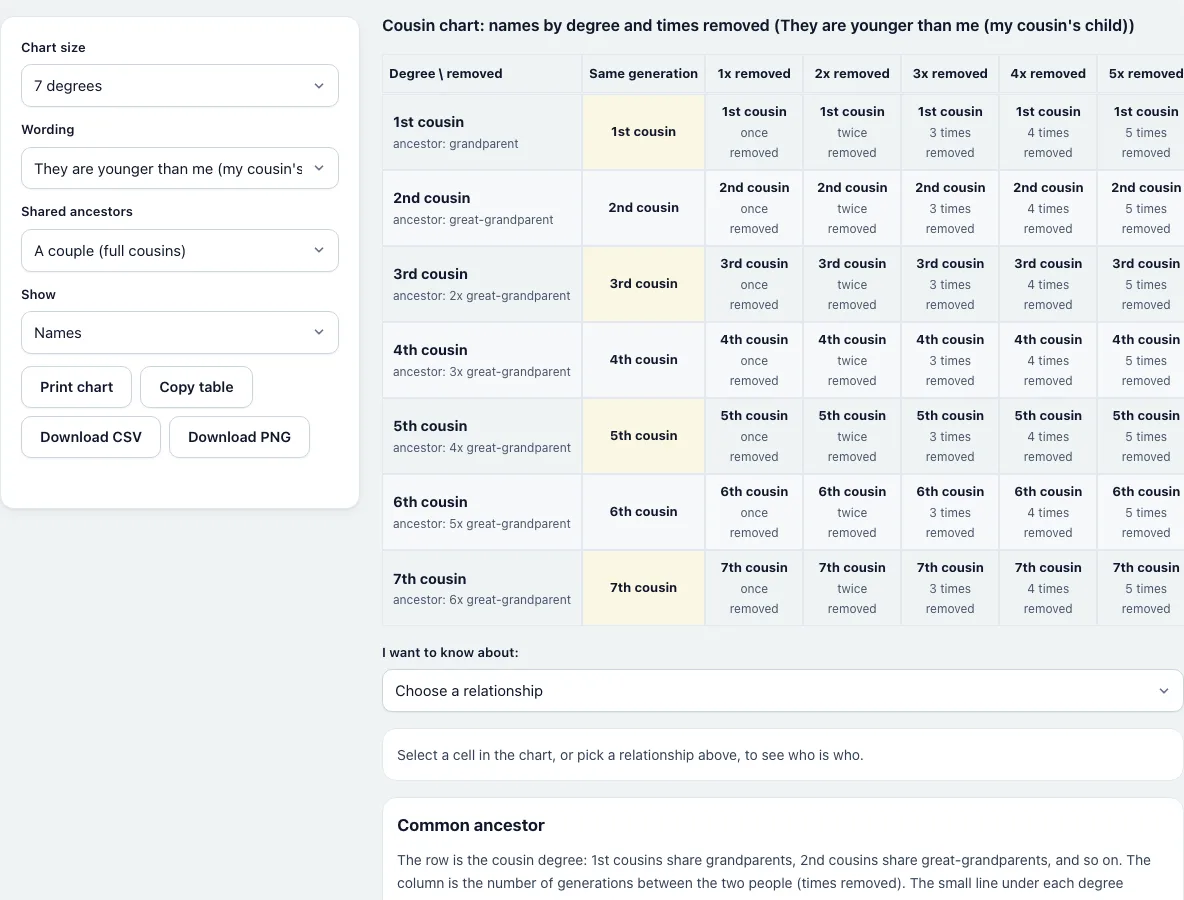
How to use the cousin chart
- Look at the row labels on the left: 1st cousin, 2nd cousin and so on. Each row also shows the shared ancestor, such as “ancestor: grandparent”.
- Look at the column headings: “Same generation”, then “1x removed”, “2x removed” and further. Find your cousin’s degree in a row and the generation gap in a column.
- Read the cell where they meet. Hover over or tab to a cell and its whole row and column are highlighted.
- Select a cell, or use “I want to know about:” to pick a relationship from a list. The panel below shows the name, the wording, the generations for you and for them, the shared ancestor and the expected DNA.
- Under “Chart size” choose 5, 7 or 9 degrees. Under “Show” choose Names, Generations (you / them) or Expected shared DNA.
- Under “Wording” choose whether the person in the cell is younger than you (“my cousin’s child”) or older (“my parent’s cousin”).
- Under “Shared ancestors” choose “A couple (full cousins)” or “One person (half cousins)” for half cousin names.
- Press “Print chart”, “Copy table”, “Download CSV” or “Download PNG”. Printing uses a landscape page with only the chart. Everything is calculated in your browser, so nothing you enter is sent anywhere.
What is a cousins removed chart?
A cousins removed chart is a grid that combines two ideas: the cousin degree (1st, 2nd, 3rd cousin) and the number of times removed. The degree comes from how far back the shared ancestor is. The removal is the number of generations between the two people. Cousins in the same generation are in the first column, with no removal.
How do you read a cousin chart?
Pick the row of the degree, which is the smaller number of generations to the shared ancestor minus one. Then pick the column of the generation gap. For a 1st cousin the shared ancestor is a grandparent, for a 2nd cousin a great-grandparent, for a 3rd cousin a 2x great-grandparent. For example, a person who is a grandchild of your 1st cousin is a “1st cousin twice removed”.
What does “removed” mean on a cousin chart?
Each step of removal is one generation. A 1st cousin once removed is your 1st cousin’s child, or your parent’s 1st cousin. The Wording setting changes which of these two the panel shows. The name is the same for both people, so you are also their 1st cousin once removed.
How many generations back do cousins share an ancestor?
Add one to the degree. 1st cousins share grandparents, 2nd cousins great-grandparents, and 5th cousins share 4x great-grandparents, six generations above them. The small line under each row label shows this ancestor, seen from the person closer to it.
How much DNA do cousins share?
The Show setting can fill the chart with the expected average share. A full 1st cousin gives 12.5%, a 2nd cousin 3.125% and a 3rd cousin 0.78125%. A 1st cousin once removed gives 6.25% and a 2nd cousin once removed 1.5625%. Real amounts vary from pair to pair, and the half cousin setting halves each value.
Frequently asked questions
What does the number in “1st cousin 2x removed” mean?
It is the number of generations between you. “2x removed” is the same as “twice removed”: the other person is two generations above or below your 1st cousin line.
Can I print the cousin chart?
Yes. “Print chart” opens the print dialog with a landscape page that holds the chart and a short note. The controls and the rest of the page are left out.
How do I get the chart into a spreadsheet?
Press “Copy table” and paste into any spreadsheet, or “Download CSV”. Both follow the current “Show” setting.
Why are first cousins in the “Same generation” column?
Because first cousins are the same number of generations from their shared grandparents. A removed cousin has a different number on each side.
Are half cousins on the chart?
Yes. Set “Shared ancestors” to “One person (half cousins)” and the names change to “half 1st cousin” and so on.
What is the difference between “removed” and “half”?
“Removed” is a generation gap between two people. “Half” means only one ancestor is shared instead of a couple. A person can be a half 1st cousin once removed.
Does the chart upload anything?
No. It is drawn and exported in your browser.
- Cousin Calculator: name one relationship from the common ancestor.
- First Cousin Once Removed: one named relationship explained from both sides.
- Relationship Chart: the family relationship chart beyond cousins.
- Relationship Calculator: find how two people in a tree are related.
- Kinship Terms: relationship words in other languages.
- Inbreeding Coefficient Calculator: how related two parents are.
- Ahnentafel Number Calculator: numbers for direct ancestors.
- How Many Ancestors Calculator: ancestors per generation.
- Gedcom Viewer: open a family tree file.