Descendant Chart
Choose a GEDCOM file and a start person to get a descendant chart you can zoom, download as SVG or PNG, print, or read as a numbered outline.
Recent
Your last 10 settings, saved only in this browser. Nothing is uploaded.
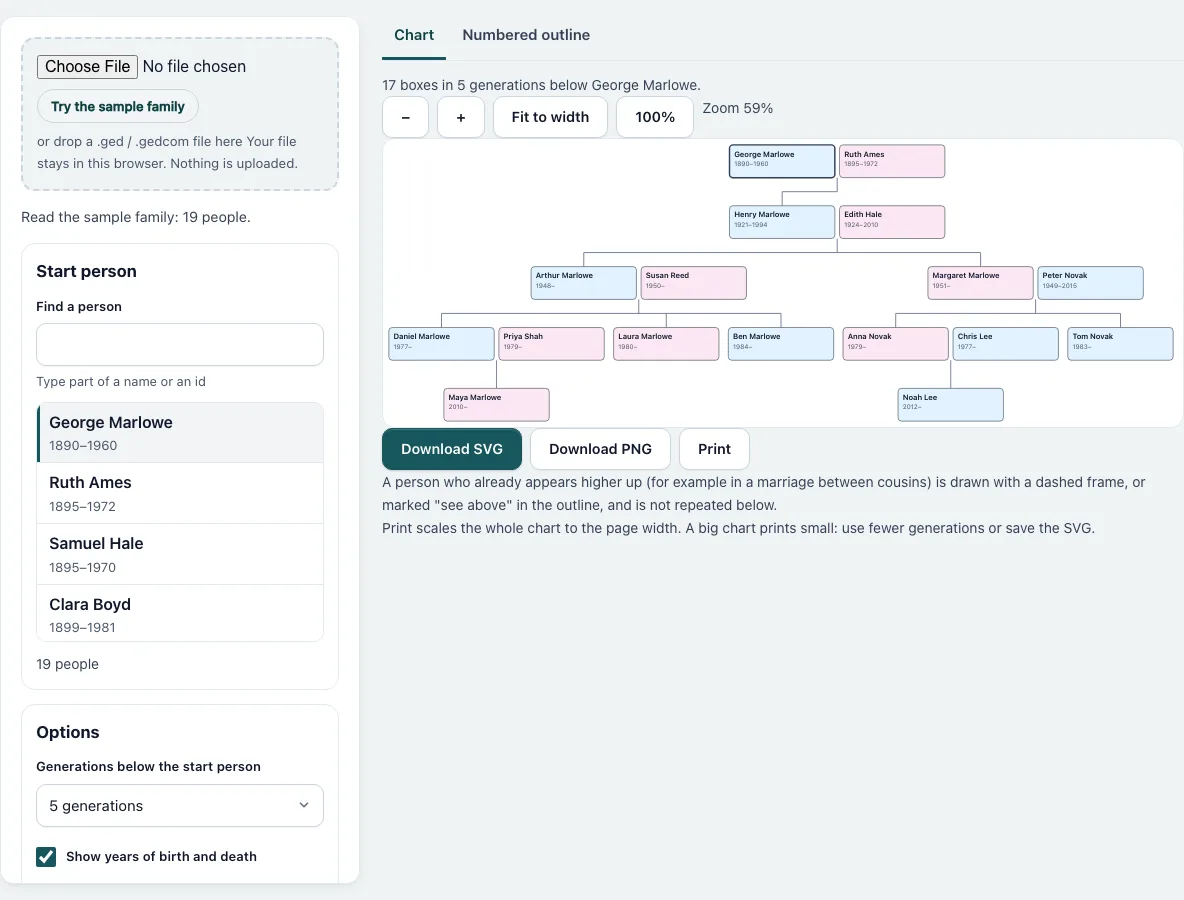
How to make a descendant chart
- Press “Choose File” and pick a .ged file, or press “Try the sample family”. The chart opens at once for the first person who has children.
- In “Start person” type part of a name or an ID in “Find a person” and click the person whose descendants you want. The list shows the first 100 matches.
- Under “Options” choose “Generations below the start person”. One generation means the children only.
- Tick or untick “Show years of birth and death” and “Show birthplace”. The birthplace adds a third line to each box.
- Read the line above the chart. It gives the number of boxes and generations. A yellow note appears if the chart was cut.
- Use “−” and “+” to zoom, “Fit to width” to see all of it, or “100%” for full size. Scroll the chart with the mouse or your finger. The chart redraws when you change any option or pick another person.
- Press “Download SVG” or “Download PNG” to save the picture, or “Print” to print it.
- Open the “Numbered outline” tab for the text version. “Show spouses (outline)” adds the partner lines. Press “Copy outline” or “Download text”. Your file is read in this browser and nothing is uploaded, so you can close the page whenever you are done.
What does a descendant chart show?
It starts with one person and shows their partners, their children, and each child’s partners and children, level by level. Partners stand beside the person; a line drops from the gap between them to the children. A person whose several marriages each have children is joined to every partner. For the sample family, the chart from George Marlowe with five generations has 17 boxes.
What does a box show?
The first line is the name, in bold. The second line has the year of birth and the year of death, written as “1890–1960”, or “1948–” when no death is known. The third line, when switched on, is the birthplace as written in the file. Names that do not fit the box are cut with “…”, and the full text appears as a tooltip.
What is d’Aboville numbering?
The start person is 1. Their children are 1.1, 1.2 and so on in the order of the file, and the children of 1.2 are 1.2.1, 1.2.2. The number tells the line from the start person to each descendant, and the number of dots tells the generation. In the sample, Maya Marlowe is 1.1.1.1.1: George’s son Henry, then Arthur, then Daniel, then Maya.
How large a chart can the page draw?
A chart is limited to 1,500 boxes, partners included. If your choice would need more, the page lowers the number of generations until it fits and says so above the chart. The outline can list up to 20,000 lines. For very large trees use fewer generations or pick a person lower in the tree.
What if a person appears twice?
When cousins marry, the same person can be reached by two lines. The second box has a dashed frame and is not expanded again, and in the outline the line ends with “(see above)”.
How is the picture saved?
The SVG is vector and can be edited. The PNG is drawn at up to twice the size, with the longest side at most 8,000 pixels. Print fits the whole chart to the page width, so a big chart prints small.
Frequently asked questions
How many generations can I show?
From 1 to 10 generations below the start person, as long as the chart stays within 1,500 boxes.
Can I hide the partners?
In the outline, yes: untick “Show spouses (outline)”. In the chart, partners always stay, because the lines to the children start between the two boxes.
Why are the generations fewer than I chose?
The chart would have had more than 1,500 boxes. The page shows the largest number of generations that fits and tells you how many it dropped.
Can I print it on one page?
Yes. Print scales the chart to the page width, in landscape for a wide chart and portrait for a tall one. For readable text on a large tree, save the SVG and print it elsewhere on bigger paper.
Can I choose another start person later?
Yes. Click another person in the list and the chart and the outline are drawn again at once, with the same options. Use the search box to find a person in a large file.
Does it need an internet connection?
Only to load the page. The file is read and the chart is drawn in your browser, and nothing is uploaded.
Related tools
- Family Group Sheet: Use it to print one couple and their children on a form.
- Family Tree Poster: Use it to print a whole tree on a large sheet.
- Gedcom Viewer: Use it to read a person’s record in detail.
- Gedcom To Pdf: Use it to make a printable book from the file.
- Ahnentafel Number Calculator: Use it to number ancestors instead of descendants.
- Cousin Chart: Use it to see how two cousins are related.
- Gedcom To Csv: Use it to export the people as a table.
- Gedcom Validator: Use it to find broken links before drawing.