Family Group Sheet
Pick a family from a GEDCOM file or start blank, edit the boxes, and print the sheet or save it as a PDF.
Recent
Your last 10 settings, saved only in this browser. Nothing is uploaded.
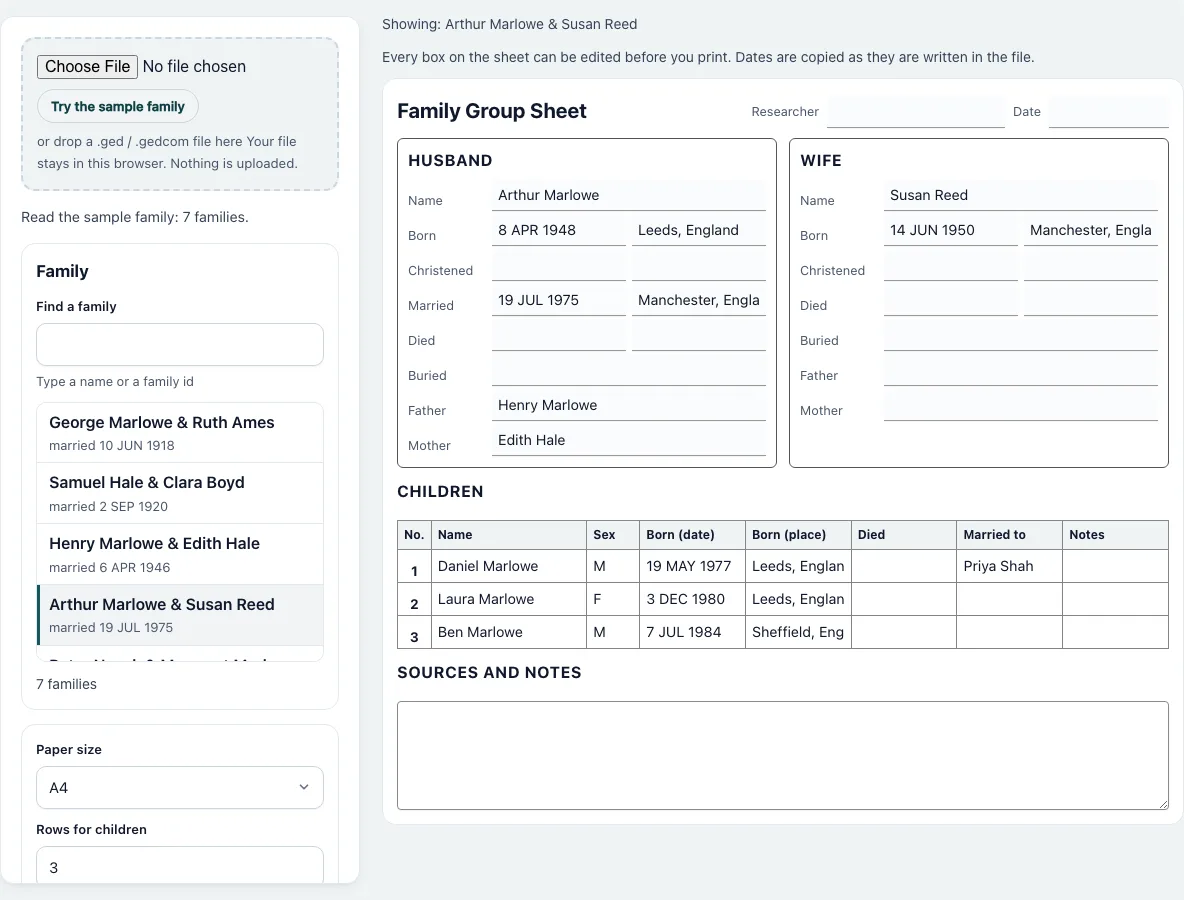
How to make a family group sheet
- Press “Choose File” and pick a .ged file, or press “Try the sample family”. The sample opens with the family that has the most children already filled in.
- In “Choose a family” type part of a name or a family ID in “Find a family”. Each entry reads “Husband & Wife” with the marriage date below it. Click one to fill the sheet.
- Check the sheet. The husband block has Name, Born, Christened, Married, Died, Buried, Father and Mother; the wife block has the same except Married. The children table has No., Name, Sex, Born, Died, Married to and Notes.
- Click any box to correct or add text. Type your name under “Researcher” and a date if you want them on the form.
- For a form to fill in by hand, press “Start a blank sheet” and set “Rows for children” between 1 and 30.
- Choose the “Paper size”: A4 or US Letter.
- Press “Print / Save as PDF”. In the print window pick a printer, or choose “Save as PDF” as the destination.
- Press “Download CSV” to save the contents as a table with the columns Section, Field and Value. Empty boxes are left out. Your file is read in this browser and nothing is uploaded, so you can close the page whenever you are done.
What is a family group sheet?
A family group sheet records one couple and their children on one page. It is the standard working form of family history research: one sheet for each marriage, so a person who married twice appears on two sheets. The page has the husband and wife, the dates and places of their main events, their parents, the children in the order of the family record, and a space for sources and notes.
Where does each box come from?
Born and Died come from the BIRT and DEAT events. Christened uses the CHR event, or the BAPM baptism event when there is no christening. Buried shows the burial date and place together in one box. Married and its place come from the MARR event of the family and appear in the husband block. Father and Mother show the names of the spouse’s own parents. A child’s “Married to” lists every partner, separated by semicolons, and “Notes” shows the text of the child’s notes.
What happens to dates?
Nothing: “ABT 1860” stays “ABT 1860” and “BET 1801 AND 1803” is shown in full. The page does not convert calendars or add a year. Edit the box if you want another style.
How many rows does the children table have?
For a family from your file, one row per child, and at least one. Change “Rows for children” to add empty rows, up to 30. Rows that already hold text are never removed when you lower the number.
Blank sheet for handwriting
The blank sheet prints with empty ruled boxes and child rows 9 mm high, so there is room to write with a pen. Every box has a printed label, so the form can be filled in without a computer. Rows you leave empty on screen print as empty rows, which is also how you add more children by hand.
Frequently asked questions
Can I save the sheet as a PDF?
Yes. Press “Print / Save as PDF” and choose “Save as PDF” as the printer in the print window of your browser. Only the sheet is printed.
Why does the husband block hold the marriage?
That is where the traditional form puts it. The wife block therefore has no Married row, and the husband’s Married boxes are filled from the family record.
How do I print more than ten children?
Set “Rows for children” to a larger number, up to 30. For a family from a file, the table has as many rows as the family has children, and you can raise the number to add empty rows.
Does it change my GEDCOM file?
No. The file is only read. Changes you type on the sheet stay on the sheet and are lost when you reload the page.
What if a family has no husband or wife in the file?
The block for the missing partner stays empty and you can type into it. A family with no named partner is listed by its ID.
Can I use it without a GEDCOM file?
Yes. Press “Start a blank sheet” and type into the boxes, or print it empty. No file is needed.
Is my file uploaded?
No. Everything happens in your browser.
Related tools
- Descendant Chart: Use it to see all descendants of one person.
- Gedcom Viewer: Use it to look through a tree person by person.
- Gedcom To Csv: Use it to export every person and family as tables.
- Gedcom To Excel: Use it for an Excel workbook of the whole tree.
- Cousin Calculator: Use it to name the relation between two people.
- Family Tree Poster: Use it to print a whole tree on one large sheet.
- Ahnentafel Number Calculator: Use it to number ancestors.
- Gedcom Validator: Use it to check the file before you print.