Gedcom Converter
Choose a GEDCOM file, pick the version or text encoding you need, and download the converted file with a report of what changed.
Recent
Your last 10 settings, saved only in this browser. Nothing is uploaded.
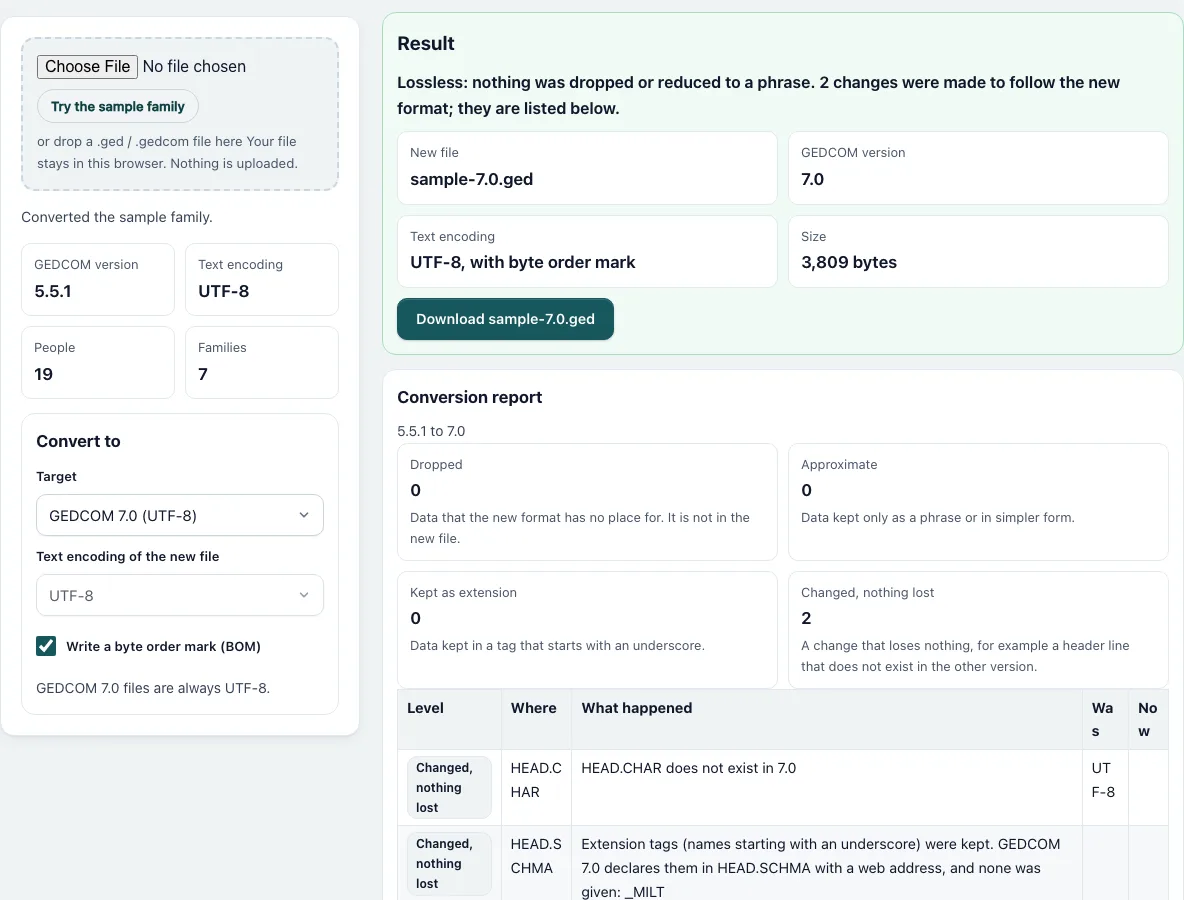
How to convert a GEDCOM file
- Press “Choose File” and pick your file, or drop it onto the dashed box. “Try the sample family” is already converted when the page opens.
- Check the tiles: GEDCOM version, Text encoding, People and Families describe your file.
- In “Convert to”, choose the “Target”: “GEDCOM 7.0 (UTF-8)”, “GEDCOM 5.5.1” or “Same version, change only the encoding”. The page starts with the other version than your file has.
- Choose the “Text encoding of the new file”: UTF-8, UTF-16 (little-endian), ANSI (Windows-1252), ANSEL or ASCII. It is fixed to UTF-8 when the new file is 7.0.
- Tick or untick “Write a byte order mark (BOM)”. The default is on for 7.0 and for UTF-16.
- Read the result card. It shows the new file name, version, encoding and size, and one sentence: “Lossless” or “N items could not be carried over exactly”.
- Read the “Conversion report”. The four counters are Dropped, Approximate, Kept as extension and Changed, nothing lost. The table shows each item with Level, Where, What happened, Was and Now.
- Press the “Download” button. The name is the original name plus the version, such as family-7.0.ged.
Below the report, “Start of the new file” shows the first 30 lines, so you can see the new header and the first records before you download. If you change an option, the conversion and the report are redone at once.
How do I convert GEDCOM 5.5.1 to 7.0?
Choose “GEDCOM 7.0 (UTF-8)”. The converter follows the migration guide of the GEDCOM 7 specification. The CHAR line is removed because 7.0 is always UTF-8, CONC lines are joined, and an inline OBJE becomes a separate record with a pointer. A date such as @#DJULIAN@ 5 JAN 1700 becomes JULIAN 5 JAN 1700. A dual year, 30 JAN 1648/9, becomes 30 JAN 1649 with the original text kept in a PHRASE line. A Windows file path such as c:\pics\a.jpg becomes file:///c:/pics/a.jpg.
How do I convert GEDCOM 7.0 to 5.5.1?
Choose “GEDCOM 5.5.1”. SNOTE records become NOTE records, and a date with a PHRASE becomes an INT date, for example INT 1 JAN 1900 (new year). The header gets GEDC with VERS 5.5.1 and FORM LINEAGE-LINKED, a CHAR line, a SOUR line and a submitter record named “Unknown” when the file had none. Long lines are split with CONC so none passes 255 characters. A @VOID@ pointer cannot be kept, and the report lists it as dropped.
What do the report levels mean?
“Dropped” means the new format has no place for the data and it is not in the new file. “Approximate” means the data was kept only as a phrase or in a simpler form. “Kept as extension” means the data sits in a tag that starts with an underscore. “Changed, nothing lost” is a change that loses nothing, such as a removed header line. The sentence “Lossless” appears when there are no Dropped and no Approximate items.
The report rows come from the rules of the conversion. They name the place in the record, for example INDI.DEAT.DATE, say what happened, and give the old and new value. Rows of the kind “Changed, nothing lost” are listed so that you can see every change, not only the losses.
How do I change the encoding of a GEDCOM file?
Choose “Same version, change only the encoding” and pick a new encoding. The CHAR line is updated to match. A character the encoding cannot hold is replaced by a question mark and listed as Dropped, with the count.
Frequently asked questions
Will converting lose data?
Sometimes, and the page tells you. Every item that is dropped or only approximated is a row in the report, and the sentence above it says how many there are. Round trips of the sample family from 5.5.1 to 7.0 and back keep all people, families, names and dates.
Can I convert a file that has errors?
Yes. The converter reads damaged files without stopping and keeps lines it does not understand. Use the Gedcom Validator first if you want to know what is wrong with the file.
Is my file uploaded?
No. The conversion runs in your browser and nothing is sent.
Which encodings can I read and write?
It reads UTF-8, UTF-16, ANSEL, ANSI (Windows-1252), ASCII and Mac Roman. It writes UTF-8, UTF-16, ANSI, ANSEL and ASCII.
Why is the encoding fixed for 7.0?
GEDCOM 7.0 files are always UTF-8, so the choice is locked when 7.0 is the target or the file is already 7.x.
Do I need the byte order mark?
UTF-16 files need it. For UTF-8 it is optional, and 7.0 files normally have one. Switch it off if a program complains about strange characters at the start of the file.
Can it open a 7.1 file?
It reads 7.1 and newer files as 7.0. Tags that 7.0 does not know are kept as extension tags.
Related tools
- Gedcom Viewer: Use it to read the converted file.
- Gedcom Validator: Use it to check the file for problems before or after converting.
- Gedcom To Csv: Use it to get the people as spreadsheet rows.
- Gedcom To Excel: Use it to get an Excel workbook of the tree.
- Remove Living People From Gedcom: Use it before you share a file.
- Gedcom Splitter: Use it to cut a big file into smaller ones.
- Gedcom Merge: Use it to combine two files.
- Family Group Sheet: Use it to print one family on one page.