Merge Gedcom Files
Choose two GEDCOM files, review the people who appear in both, and download one merged file.
Recent
Your last 10 settings, saved only in this browser. Nothing is uploaded.
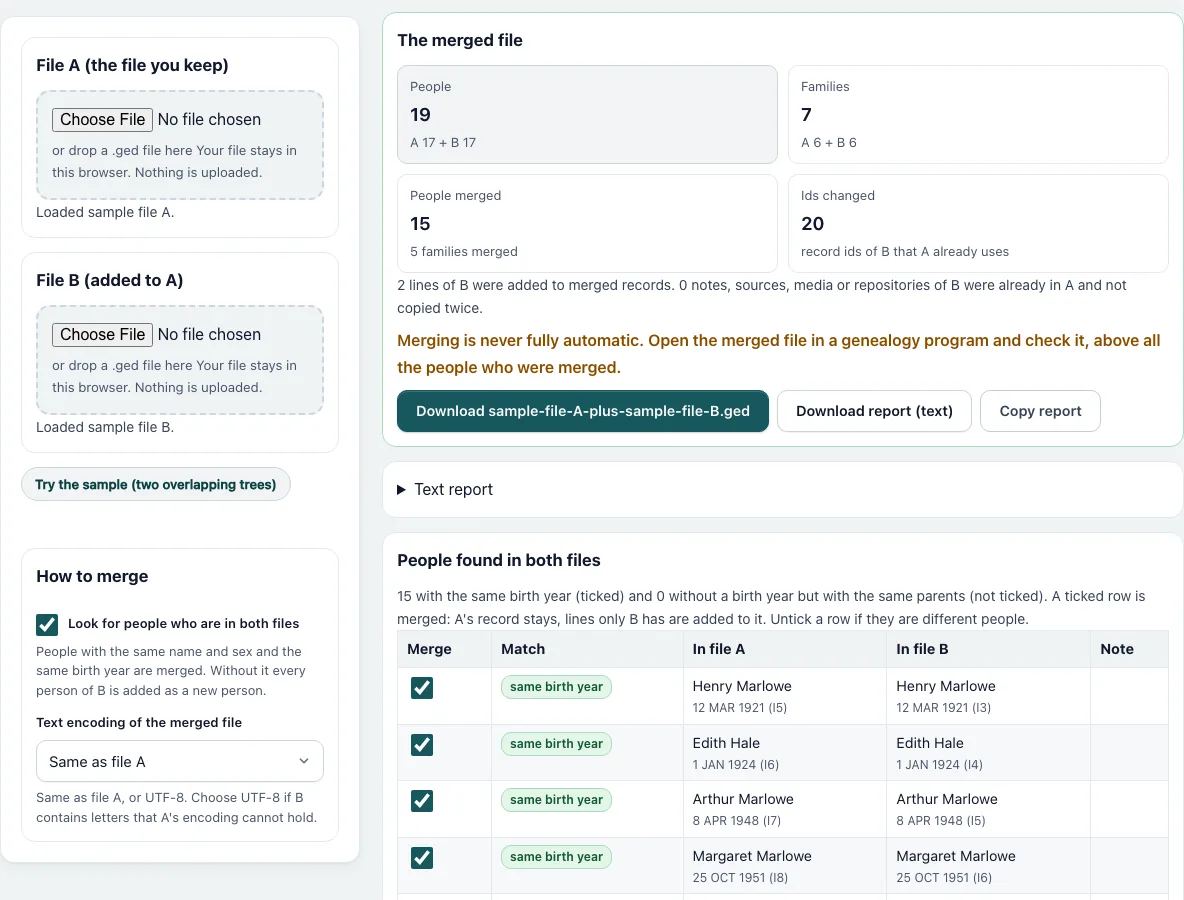
How to merge two GEDCOM files
- Press “Choose file A” and pick the file you want to keep. Press “Choose file B” and pick the file to add. You can also drop a .ged file on each dashed box. “Try the sample (two overlapping trees)” fills both; it is already loaded when the page opens.
- Leave “Look for people who are in both files” ticked to find duplicates, or untick it to add every person of B as a new person.
- Choose the text encoding of the merged file: the same as file A, or UTF-8.
- Read the table “People found in both files”. Each row shows the person in A and in B with birth and id. “same birth year” rows are ticked. Rows marked “possible” have no birth date on either side but the same parents’ names, and are not ticked. Untick a row if the two are different people.
- Read “The merged file”: people, families, people merged, ids changed, and how many lines of B were added to merged records. The text report lists the new ids and the records that received lines from B.
- Press “Download” to save the merged .ged, or download or copy the report.
- Open the result in a genealogy program, look first at the records named in the report, and check the file with the Gedcom Validator.
How are record ids kept apart?
GEDCOM ids such as @I1@ are only valid inside one file, so two files often use the same id for different people. Every record of B whose id A already has, of any kind (person, family, note, source, media, repository), gets the next free id with the same letter, for example @I6@ in place of @I1@. Every pointer in B follows the change. In the sample, 20 ids of B change.
How are duplicate people found?
Names are compared without case, accents and punctuation, using surname plus given name of any name line, and the sex has to be the same. A match needs the same birth year, or no birth year on either side and the same set of parents’ names. A person with no birth year on one side only is not a match. A name with no surname, such as the placeholder “Living”, never matches. If several people of A fit one person of B, the row says so and is not ticked.
What happens when two people are merged?
A’s record stays. Each line of B, with its sub-lines as one block, is added only if A has no line with exactly the same text, so a death event that only B has is added, and an equal birth event is not. Pointers to B’s person now point to A’s. B’s record is dropped. If B gives a different birth date for the same year, both events are kept, so check those records.
How are families merged?
After the people are redirected, a family of B with the same husband and the same wife as a family of A is merged into it: children of both, marriage events as blocks, no child twice. Other families of B are added.
What about notes and sources?
Notes, sources, media and repositories of B that are line for line the same as one of A are not copied twice. The rest is added.
What is the result for the sample?
17 and 17 people with 15 in both give 19 people in 7 families.
Frequently asked questions
Does merging add people twice?
Only the ones the tool did not recognise. Untick a row if two people should stay separate, or tick a “possible” row if they are the same person.
Is the merge fully automatic?
No. Two people with the same name, sex and birth year are not always the same person, and two lines that differ slightly are both kept. The tool says this next to the download.
Which file wins when the data differ?
File A. Its lines stay as they are. B’s lines are added next to them when they differ, so a person can have two birth events.
Does it change the header of the file?
No. The header, the submitter and the trailer come from file A. B’s header is not copied, and its submitter is copied only if a line points to it.
What if B has letters that A’s encoding cannot hold?
Choose UTF-8. The tool warns you how many characters would be replaced otherwise.
Do the ids of file A change?
No. Every id of A stays as it is. An id of B changes only when A already uses it, and the report lists each old and new id.
Can I merge more than two files?
Yes. Merge the first two, then merge the result with the third as file A.
Related tools
- Gedcom Splitter: Use it to cut a file into separate trees or one branch.
- Gedcom Validator: Use it to check the merged file for broken links.
- Gedcom Viewer: Use it to read the people of the result.
- Remove Living People From Gedcom: Use it before you share the merged file.
- Gedcom Converter: Use it to change the version or the encoding.
- Gedcom To Csv: Use it to get a spreadsheet of the people.
- Family Group Sheet: Use it to print a merged family.
- Descendant Chart: Use it to draw the result.