Gedcom Splitter
Choose a GEDCOM file and split it into separate trees, cut out one branch, or divide it into files of similar size.
Recent
Your last 10 settings, saved only in this browser. Nothing is uploaded.
How to split a GEDCOM file
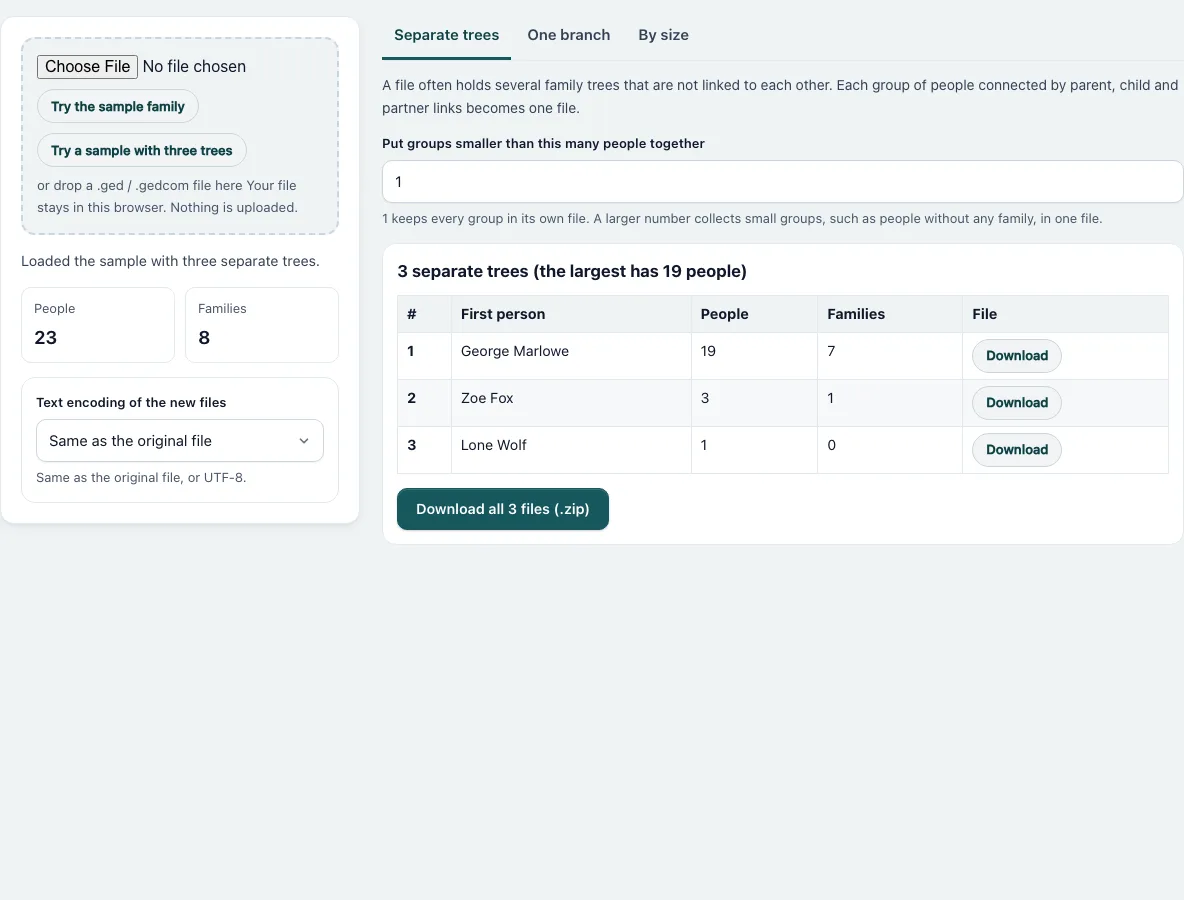
- Press “Choose a GEDCOM file”, or drop a .ged file on the dashed box. “Try the sample family” loads one tree of 19 people. “Try a sample with three trees” adds a tree of 3 people and one person alone; it is open when the page loads.
- Choose the text encoding of the new files: the same as the original, or UTF-8.
- For separate trees, stay on the tab “Separate trees”. The list shows the first person, people and families of each group. Press “Download” next to a row, or “Download all” for a .zip file. To collect small groups in one file, enter a number in “Put groups smaller than this many people together”.
- For one branch, open “One branch”. Type in “Find a person” and pick the person. Choose “Descendants”, “Ancestors” or “Ancestors and descendants”, and set “How many generations” to a number or “No limit”.
- Tick “Include spouses and partners”, “Include brothers and sisters” or “Include the full family of each person” if you need them. The result card shows people, families and records, and “Who is in the file” lists the names. Press the download button.
- To divide a file by size, open “By size” and enter the “Number of files” (2 to 200). Read the sentence under the heading. It tells you whether a tree is too big to fit.
- Check the new files with the Gedcom Validator.
How are the separate trees found?
Two people belong to the same group if a chain of families leads from one to the other: as parent, child or partner. A file made from several imports, or a collection of unrelated lines, often has several groups. A person with no family is a group of one. With “Put groups smaller than” set to 5, the sample with three trees gives a file of 19 people and a second of 4, the Fox family and the lone person together.
How is a branch cut out?
Ancestors follow each person’s parent family, the birth family unless only an adoptive one exists. Descendants follow every family a person is a partner in. The full family option comes first: the parents, siblings, partners and children of each person of the branch, one step only. Siblings are added next, then spouses. In the sample, the descendants of George Marlowe are 11 people in 6 families, and the ancestors of Maya Marlowe are 11 people in 5 families (14 with siblings).
What happens to the links of the people left out?
Lines that point to a person or family that is not in the new file are deleted from the kept records: FAMC, FAMS, HUSB, WIFE, CHIL, ASSO and ALIA. A branch drops a family when fewer than two of its members are in the file, so a person whose parents are left out loses the FAMC line. Separate trees and size files keep every family of their people.
What is copied besides people and families?
HEAD, SUBM, SUBN and TRLR, and every NOTE, SNOTE, SOUR, OBJE and REPO record that a kept line points to, directly or through another record. Records that nothing points to are not copied.
What are the limits of splitting by size?
A tree is never cut. If one tree has more people than the target, as with the 19 people of the sample against 12 per file, one file is larger than the rest, and the tool says so.
Frequently asked questions
Does the tool upload my file?
No. It reads the file and writes the new files in your browser. The .zip file is made there too.
Which encoding do the new files use?
The same as the original file, or UTF-8 if you choose it. When a character cannot be written in the original encoding, the tool tells you how many were replaced.
Can I split one connected tree into two?
Yes, with “One branch”. Pick a person and take the descendants, then the ancestors of the same person or another one. A tree cannot be cut into halves automatically, because every cut breaks links.
Why is the first person of a group named in the list?
It is the first person of the group in the file. It helps you to recognise the tree and gives the file name, for example sample-trees-part-2-Zoe-Fox.ged.
Are the people’s ids kept?
Yes. Record ids are copied as they are, so a person has the same id in the new file as in the original.
Does the .zip file contain compressed files?
No. The files are stored without compression, so any zip program opens it. The zip file is about as large as the .ged files together.
Related tools
- Gedcom Merge: Use it to combine two files again.
- Gedcom Validator: Use it to check a new file for broken links.
- Gedcom Viewer: Use it to read the people of a file.
- Remove Living People From Gedcom: Use it before you share a branch.
- Gedcom Converter: Use it to change the version or the encoding.
- Descendant Chart: Use it to draw the descendants of a person.
- Family Group Sheet: Use it to print one family.
- Gedcom To Csv: Use it to get a spreadsheet of the people.