Gedcom To Csv
Choose a GEDCOM file, set the delimiter and tables, and download CSV files or one .zip for Excel and other spreadsheets.
Recent
Your last 10 settings, saved only in this browser. Nothing is uploaded.
How to convert a GEDCOM file to CSV
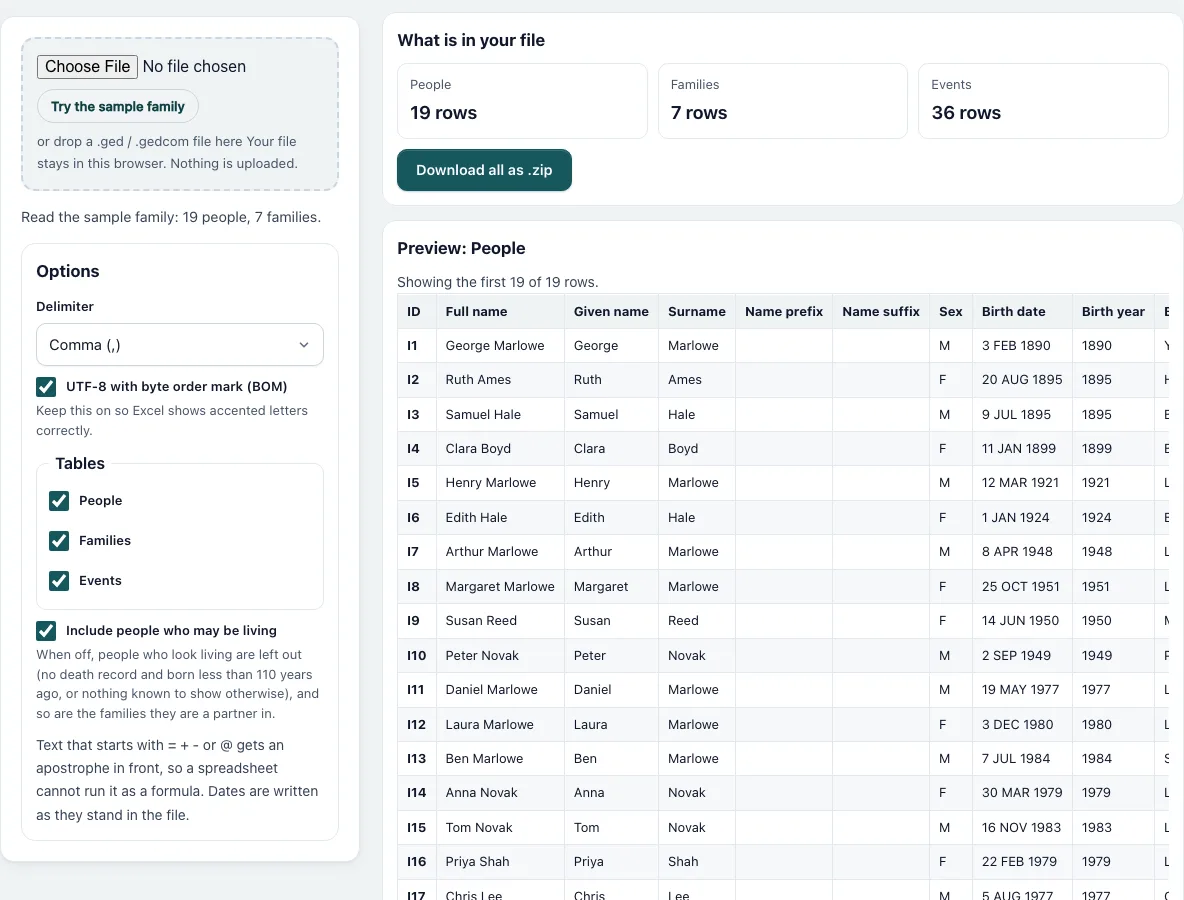
- Press “Choose File” and pick your .ged file, or drop it on the dashed box. “Try the sample family” loads a made-up family of 19 people, and it is already converted when the page opens.
- Read the line under the box. It says how many people and families were found.
- Under “Delimiter” choose Comma, Semicolon or Tab. Semicolon is the usual choice for Excel in countries that write decimals with a comma.
- Keep “UTF-8 with byte order mark (BOM)” ticked if you will open the files in Excel. Untick it for programs that dislike the extra three bytes at the start.
- In “Tables” tick People, Families and Events as needed. At least one must stay ticked.
- Untick “Include people who may be living” if you want to share the data without them. The summary tells you how many people were left out.
- Look at the “What is in your file” tiles for the row count of each table, then scroll through the previews of the first 20 rows.
- Press “Download” under a preview to save that table, for example family-people.csv, or press “Download all as .zip” to save them together. Changing any option rebuilds the files at once.
What does the People table contain?
Each person is one row with 20 columns: ID, full name, given name, surname, name prefix, name suffix, sex, birth date, birth year, birth place, death date, death year, death place, burial place, occupation, father ID, mother ID, spouse IDs, number of children and number of notes. For George Marlowe in the sample file the row starts I1, George Marlowe, George, Marlowe and carries “3 FEB 1890”, then 1890 and “York, England”. Dates are copied exactly as they are written in the file. The year column is a separate number: it is the Gregorian year of the first date in the field, so “BET 1850 AND 1860” gives 1850 and a text such as “(unknown)” gives an empty cell.
What are the Families and Events tables?
A Families row has the family ID, husband and wife with their IDs and names, the marriage date, year and place, the divorce date, and the children as IDs separated by spaces and as names separated by semicolons. The Events table is in long format: record ID, name, tag such as BIRT, DEAT, OCCU or MARR, type, date, year, place, value and note. People come first, then families, whose events are named “Husband & Wife”.
How does it protect against spreadsheet formulas?
A cell that starts with =, +, - or @ can be run as a formula when a spreadsheet opens a CSV file. Text that starts that way, or with a tab or a carriage return, gets an apostrophe in front. Numbers are not changed. Fields that contain the delimiter, a double quote or a line break are put in double quotes with inner quotes doubled, as in RFC 4180, and lines end with a carriage return and a line feed.
Which people count as living?
The page uses the rule of the engine behind the Gedcom Validator: no death or burial record and born less than 110 years ago counts as living. When nothing at all is known about a person and no relative has a usable date, the person is treated as living too.
Frequently asked questions
Can I open the CSV files in Excel?
Yes. Leave the byte order mark ticked so accented letters display correctly. If Excel puts everything in one column, switch the delimiter to Semicolon and download again.
Is my file uploaded anywhere?
No. The file is read and converted in your browser and the page makes no network request with your data.
Why is the year column sometimes empty?
The year is read from the date. A date written only as a phrase, an empty date or text the reader cannot understand gives an empty cell, while the date as written still appears in the date column.
Can I get the whole file in one table?
No. A tree is a set of linked records, so it is split into People, Families and Events. IDs let you join them again in a spreadsheet.
Which name is used when a person has several?
The first NAME line of the record is used for the name columns. Other names, such as a birth name listed second, are not exported.
Are notes and sources included?
The People table has the number of notes. The Events table has the note text attached to each event. Source citations and media are not exported.
Related tools
- Gedcom To Excel: Use it when you want one workbook with the same three tables.
- Gedcom Viewer: Use it to read the tree before exporting.
- Gedcom Validator: Use it to find errors in dates and links first.
- Remove Living People From Gedcom: Use it to make a shareable GEDCOM file.
- Gedcom Converter: Use it to change version or text encoding.
- Gedcom Splitter: Use it to cut a large file into parts.
- Family Group Sheet: Use it to print one family on a form.
- Descendant Chart: Use it to draw the descendants of one person.