Gedcom To Excel
Choose a GEDCOM file, pick the sheets you want and download an Excel workbook of your family tree.
Recent
Your last 10 settings, saved only in this browser. Nothing is uploaded.
How to convert a GEDCOM file to Excel
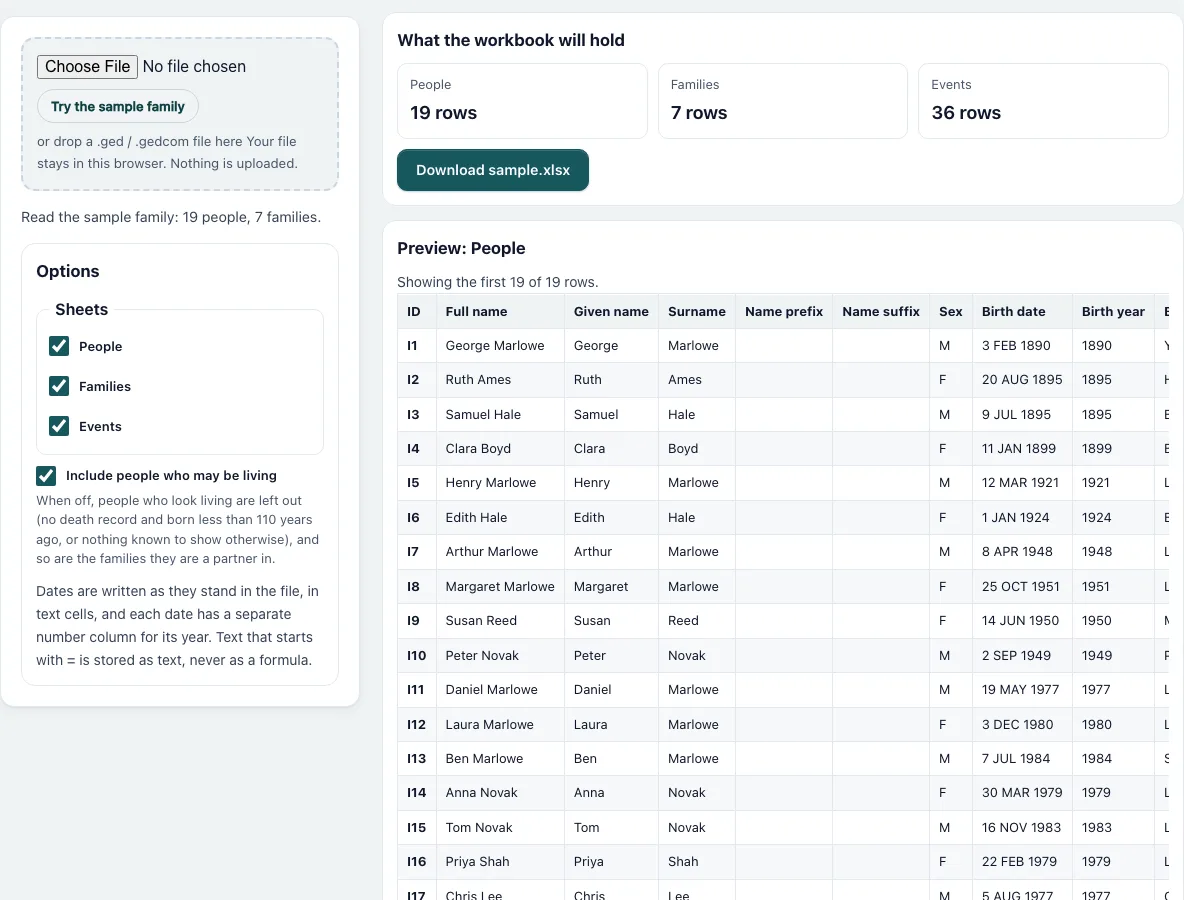
- Press “Choose File” and pick your .ged file, or drop it on the dashed box. “Try the sample family” loads a made-up family of 19 people, and the page already shows it when it opens.
- Check the line under the box: it names the file and counts people and families.
- Under “Sheets” tick People, Families and Events as you need them. At least one stays ticked.
- Untick “Include people who may be living” if the workbook will be shared. The tiles then show the lower row counts and a line says how many people were left out.
- Read the “What the workbook will hold” tiles, which give the number of rows for each sheet.
- Scroll through the previews. Each shows the first 20 rows with the same column names that the sheet will have.
- Press the “Download” button, for example “Download sample.xlsx”. The status line says when the workbook is ready and how large it is.
- Open the file in Excel, Numbers, LibreOffice or Google Sheets. Use the filter buttons in the header row to find a surname, a place or a year range. Your file is read in this browser and nothing is uploaded, so you can close the page whenever you are done.
What is in each sheet?
People has one row per person: ID, full name, given name, surname, name prefix, name suffix, sex, birth date, birth year, birth place, death date, death year, death place, burial place, occupation, father ID, mother ID, spouse IDs, number of children and number of notes. Families has the family ID, husband and wife with IDs and names, marriage date, year and place, divorce date, and the children as IDs and names. Events lists every event in long format with record ID, name, tag, type, date, year, place, value and note.
Why are dates text and years numbers?
GEDCOM dates can be “ABT 1850”, “BET 1850 AND 1860” or “3 FEB 1890”, and a spreadsheet would guess wrongly at many of them. The date columns therefore hold the text as written. The year columns hold the Gregorian year of the first date as a number, so “BET 1850 AND 1860” gives 1850. A date that is only a phrase gives an empty cell.
Can a cell run a formula?
No. Every text cell is stored as text. A name or place that starts with = + - or @ is shown as it is and is not calculated, so there is no need to change it.
How big can the workbook be?
An Excel sheet holds 1,048,576 rows, and the page refuses to build a sheet with more. A text longer than 32,767 characters is cut to that length, which is the limit of one cell. The workbook is not compressed, so it is larger than the same data saved by Excel.
Who counts as living?
A person with no death or burial record who was born less than 110 years ago is treated as living. When nothing is known about a person, the page also treats the person as living. A spreadsheet is a good place to sort, filter and count people, but it does not keep the links between records the way a GEDCOM file does, so keep the original file as your master copy.
Frequently asked questions
Does it create an .xlsx or an older .xls file?
An .xlsx file, the format that current versions of Excel, Numbers, LibreOffice and Google Sheets all open.
Is my GEDCOM file sent to a server?
No. The file is read and the workbook is built inside your browser. Nothing is uploaded.
Why are some year cells empty?
The year is taken from the date. If a person has no date, or the date is only a phrase such as “(about the time of the flood)”, the year cell is empty and the date column still shows the text.
Can I get CSV instead?
Yes. Use the Gedcom To Csv page for comma, semicolon or tab separated files, or a .zip of all tables.
Which name is used if a person has several?
The first NAME line in the record. Other names are not exported.
Do the filter buttons work in the header row?
Yes. The header row has an automatic filter and stays at the top while you scroll, so you can filter People by sex, place or birth year straight away.
Are sources and photos included?
No. The sheets contain people, families and events with their notes. Source citations and media files are not exported.
Related tools
- Gedcom To Csv: Use it for plain CSV files or a .zip of all tables.
- Gedcom Viewer: Use it to look through the file before exporting.
- Gedcom Validator: Use it to find date and link errors first.
- Remove Living People From Gedcom: Use it to prepare a GEDCOM file you can share.
- Gedcom Converter: Use it to change version or text encoding.
- Descendant Chart: Use it to draw the descendants of one person.
- Family Group Sheet: Use it to print one family on a form.