Gedcom To Pdf
Load a GEDCOM file and download a family book as a PDF, with one block per person and an index. It is made in your browser and your file is not uploaded.
Recent
Your last 10 settings, saved only in this browser. Nothing is uploaded.
Want a print-ready poster edition? Join the waitlist
We are planning a print-ready family tree poster edition (PDF) made from your GEDCOM file. Leave your email and we write to you once, when it launches. The price is announced at launch. This is not an order and you pay nothing.
We store your email, the language and page you signed up on, the date and time, and a country code. We use it only to tell you when posters launch; it is never shared. To unsubscribe, email support@lineagesmith.com with the word "unsubscribe". What we store.
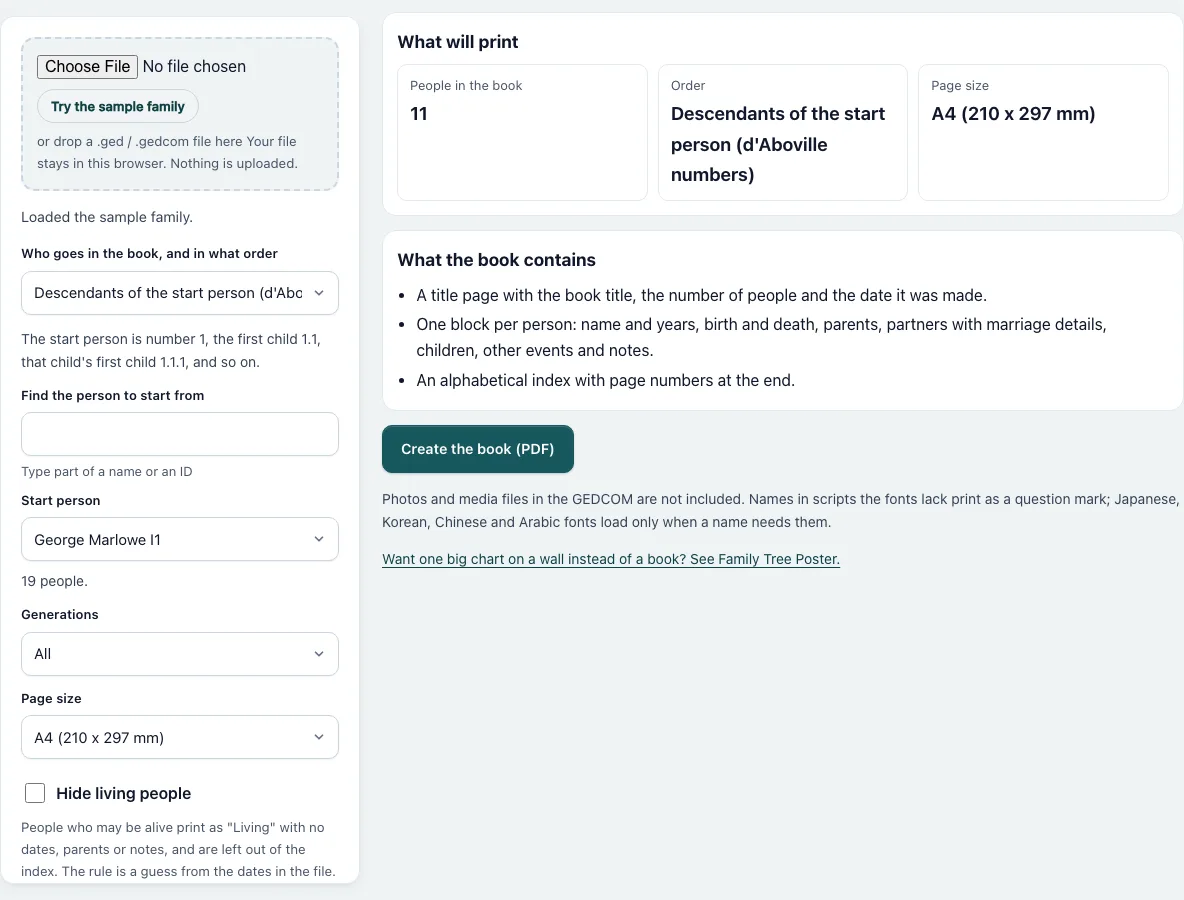
How to convert a GEDCOM file to PDF
- Press “Choose File” and pick your .ged or .gedcom file, or drop it on the dashed box. “Try the sample family” loads a made-up family.
- In “Who goes in the book, and in what order” pick one of three options: descendants with d’Aboville numbers, ancestors with Ahnentafel numbers, or everyone by surname.
- For the first two, type part of a name or an ID under “Find the person to start from” and pick the person in “Start person”. “Generations” limits how far the book goes.
- Choose the “Page size”: A4 or US Letter.
- Tick “Hide living people” if the PDF will be shared. Those people print as “Living” with nothing else.
- Choose the language of the printed words, and type a title if you do not want the default.
- Check “What will print”: it gives the number of people in the book and how many of them print as “Living”.
- If the list of people is long, the line under it says how many match; keep typing to narrow it.
- Press “Create the book (PDF)”. The download starts by itself, and the line next to the button gives the page count and the time it took. Open the PDF and look at the title page and the index before you print or share it.
What numbers does the book use?
In descendants order the start person is number 1, the first child is 1.1, that child’s first child is 1.1.1, and the second child of the start person is 1.2. This is the d’Aboville system, and the number tells you the generation by counting the dots. In ancestors order the start person is 1, the father is 2 and the mother is 3. The father of any person is twice that person’s number, and the mother is twice the number plus one, so the father’s mother is 5. This is the Ahnentafel system. Order by surname uses no numbers.
Who is in the book?
In descendants order the book lists the start person and their children, grandchildren and so on. Partners are named in each block but get no block of their own. For the sample family, the descendants of George Marlowe are 11 people, and the ancestors of Ben Marlowe are 9. With “Hide living people” on, a person with no death record who was born less than 110 years ago prints as “Living”. In the sample, 9 of those 11 print that way. By surname order leaves hidden people out of the book completely, so the sample then has 7 people.
How long does a big book take?
The PDF is written by a background worker, so the page stays usable. A generated file of 2,003 people, ordered by surname, gave a 303-page book of 2.5 MB. It took about 5 seconds in headless Chromium on the machine used for testing, and your computer may differ. The sample family takes a fraction of a second.
What is not in the book?
Photos and other media files in the GEDCOM are not printed. A character that none of the fonts has prints as a question mark. Japanese, Korean, Chinese and Arabic fonts load only when a name needs them.
Frequently asked questions
Is my GEDCOM file uploaded?
No. The page reads the file in your browser and writes the PDF in a worker inside the same page. The only requests are for the PDF code and the font files.
Can I get a chart on one big sheet instead?
Yes. Family Tree Poster prints a tree on one page from A4 to A0, or on small sheets you tape together.
How are living people found?
A person with no death or burial record who was born less than 110 years ago is treated as living. If the birth date is missing, the dates of children, parents or partners decide. It is a rule of thumb, so check the PDF before you share it.
Are the other languages correct?
English is the reviewed text. The other 19 languages are marked “(draft)” because native speakers have not reviewed them.
Does the PDF have a watermark?
No watermark and no logo are added. You may use the PDF for personal or commercial purposes, for example to print copies for a family reunion or to sell a printed family history.
What does the title page say?
The book title, the number of people and the date the PDF was made. The default title is “Family book” in the chosen language. Type your own under “Book title (optional)” to replace it.
Related tools. Pick the one that matches the next step:
- Family Tree Poster prints a tree as one big page or as tiles.
- GEDCOM Viewer read the people in the file before you print.
- GEDCOM to CSV when you need a table instead of a book.
- GEDCOM to Excel when you need a spreadsheet.
- Remove Living People From GEDCOM makes a cleaned .ged file to share.
- Family Group Sheet prints one couple and their children on a page.
- Ahnentafel Number explains the ancestor numbers used in the book.
- GEDCOM Validator finds problems that would print wrongly.