Gedcom Validator
Choose a GEDCOM file to get a list of problems with the header, ids, links and dates, each with a plain explanation and a fix.
Recent
Your last 10 settings, saved only in this browser. Nothing is uploaded.
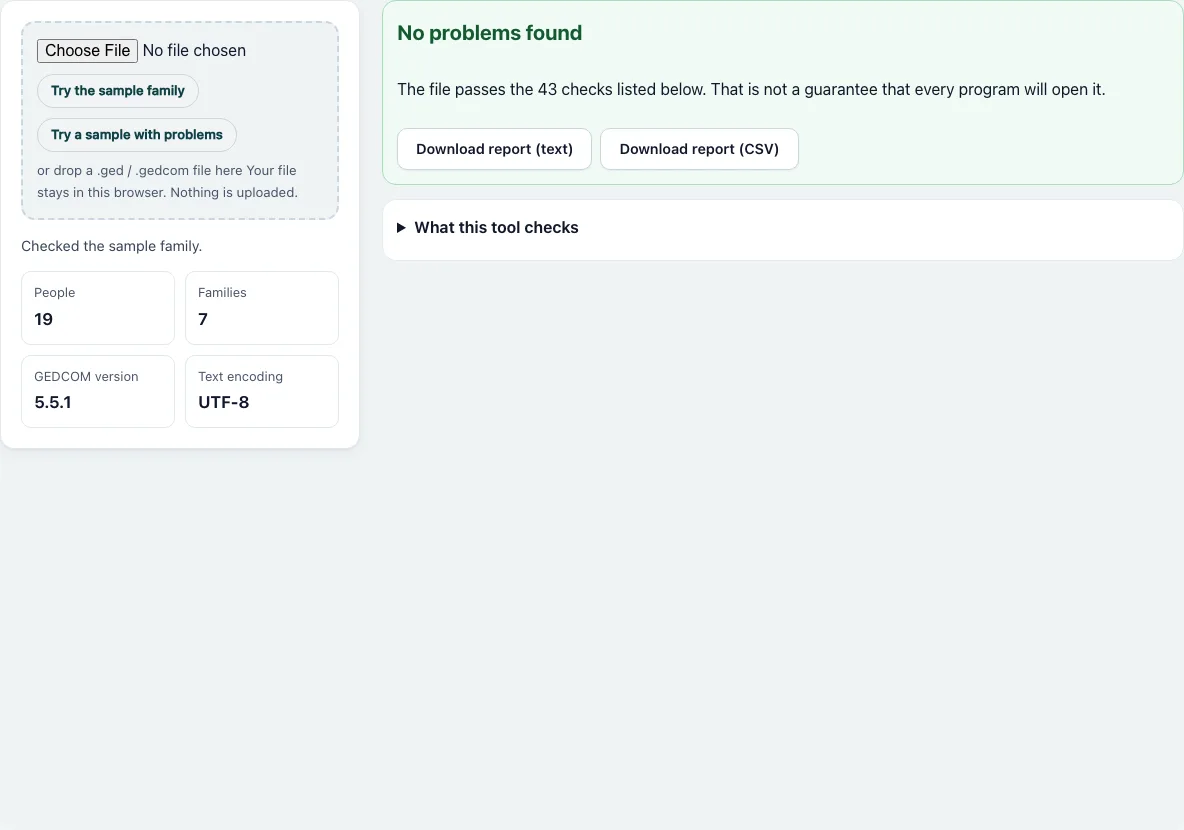
How to check a GEDCOM file
- Press “Choose File” and pick a .ged, .gedcom or .txt file, or drop it onto the dashed box. To see the tool work first, use “Try the sample family” (a clean file, already checked when the page opens) or “Try a sample with problems”.
- Read the tiles under the box: People, Families, GEDCOM version and Text encoding.
- Look at the top card. It says “No problems found” or “N findings” with the counts of Errors, Warnings and Notes.
- Read the sections Errors, Warnings and Notes. Each problem has a heading with a count, “Why it matters”, “How to fix”, and a list of places. Every place shows the line number and the record ID.
- Only 25 places are listed per problem. Press “Show all” to list the rest.
- Fix the file in your genealogy program or a text editor, then export it again and check the new file. Fixing a problem at its source is better than editing the exported text.
- Press “Download report (text)” or “Download report (CSV)” to keep the list. The CSV has the columns severity, rule, problem, record, line, message and how_to_fix.
Open “What this tool checks” to see every check that applies to your file with its severity.
How do I know if a GEDCOM file is valid?
No page can promise that every program will accept a file. This tool tests the file against 43 checks (42 for GEDCOM 7 files) and tells you which fail. A file that passes them has none of those problems. Programs differ in how strict they are, so a file that passes can still be refused by one that is stricter.
What does the validator check?
The checks fall into groups:
- Header and trailer: one HEAD first, one 0 TRLR last, a GEDC block with a version, and for versions before 7 the CHAR, SOUR and SUBM lines and the FORM line.
- Ids and pointers: every record has its own id, and every pointer such as HUSB, WIFE, CHIL, FAMC, FAMS, SOUR or NOTE points to a record of the right kind.
- Links in both directions: a person who lists a family must be listed in it, and the reverse.
- Lines: levels that jump, lines that are not GEDCOM lines, empty lines, empty values and, before version 7, lines over 255 characters.
- Dates and ages, from the core reader: dates that cannot be read, death before birth, ages over 122, parents too young or too old, a person who is their own ancestor, and possible duplicates.
What do errors, warnings and notes mean?
Errors are likely to break an import or lose data, for example a pointer to a record that does not exist. Warnings are probably wrong but most programs still open the file, for example a family that does not list a child who says they belong to it. Notes are worth a look and may be correct, such as a person without a name.
What does a finding look like?
For the sample with problems, the tool reports on line 22: “The id @I3@ is also used by the record on line 20.” The explanation says a shared id makes pointers ambiguous, and the fix is to give one record a new id and update the pointers that mean it. The same sample also shows a missing trailer, a pointer to a missing record and a date of 32 JAN 1900.
How this tool works and where the numbers come from
The file is read in your browser and tested against 43 checks (42 for GEDCOM 7): header and trailer, record ids and pointers, links in both directions between people and families, line structure, and dates and ages. Rules for versions before 7 follow the GEDCOM 5.5.1 specification; GEDCOM 7 files follow the FamilySearch GEDCOM 7.0 specification.
Sources
Frequently asked questions
Is a file with no findings valid GEDCOM?
It passes the checks the tool lists. The tool does not certify GEDCOM validity and has not tested the file in any particular program.
Is my file uploaded for the check?
No. The check runs in your browser and the file is not sent anywhere.
Does it check GEDCOM 7 files?
Yes. For 7.x files it applies the checks for all versions plus four that are specific to 7: no CHAR line, no CONC lines, ids made of capital letters, digits and underscore, and UTF-8 encoding. The checks that only apply before version 7 are skipped.
Does it check the family data as well as the file structure?
To a degree. It reads dates and ages and flags contradictions such as a death before the birth, but it cannot know whether a name or a date is true. Only your sources can tell that.
Can it fix the file for me?
No. It reports problems and how to fix them. The Gedcom Converter can change the version or re-save the file as UTF-8.
Why does it report 255-character lines?
GEDCOM 5.5.1 allows lines of at most 255 characters. Longer text is continued with CONC lines. GEDCOM 7 has no such limit, so the check is skipped for 7.x files.
What do I do with the CSV report?
Open it in a spreadsheet and sort by severity or line. Work through the errors first.
Related tools
- Gedcom Viewer: Use it to read the people and records of the file.
- Gedcom Converter: Use it to change the version or save the file as UTF-8.
- Gedcom To Csv: Use it to get the people as spreadsheet rows.
- Gedcom To Excel: Use it to get an Excel workbook of the tree.
- Gedcom Splitter: Use it to cut a big file into smaller ones.
- Gedcom Merge: Use it to combine two files.
- Remove Living People From Gedcom: Use it before you share a file.
- Relationship Calculator: Use it to find how two people are related.