Gedcom Viewer
Choose a .ged or .gedcom file to browse its people, events, notes and families. The file never leaves your browser.
Recent
Your last 10 settings, saved only in this browser. Nothing is uploaded.
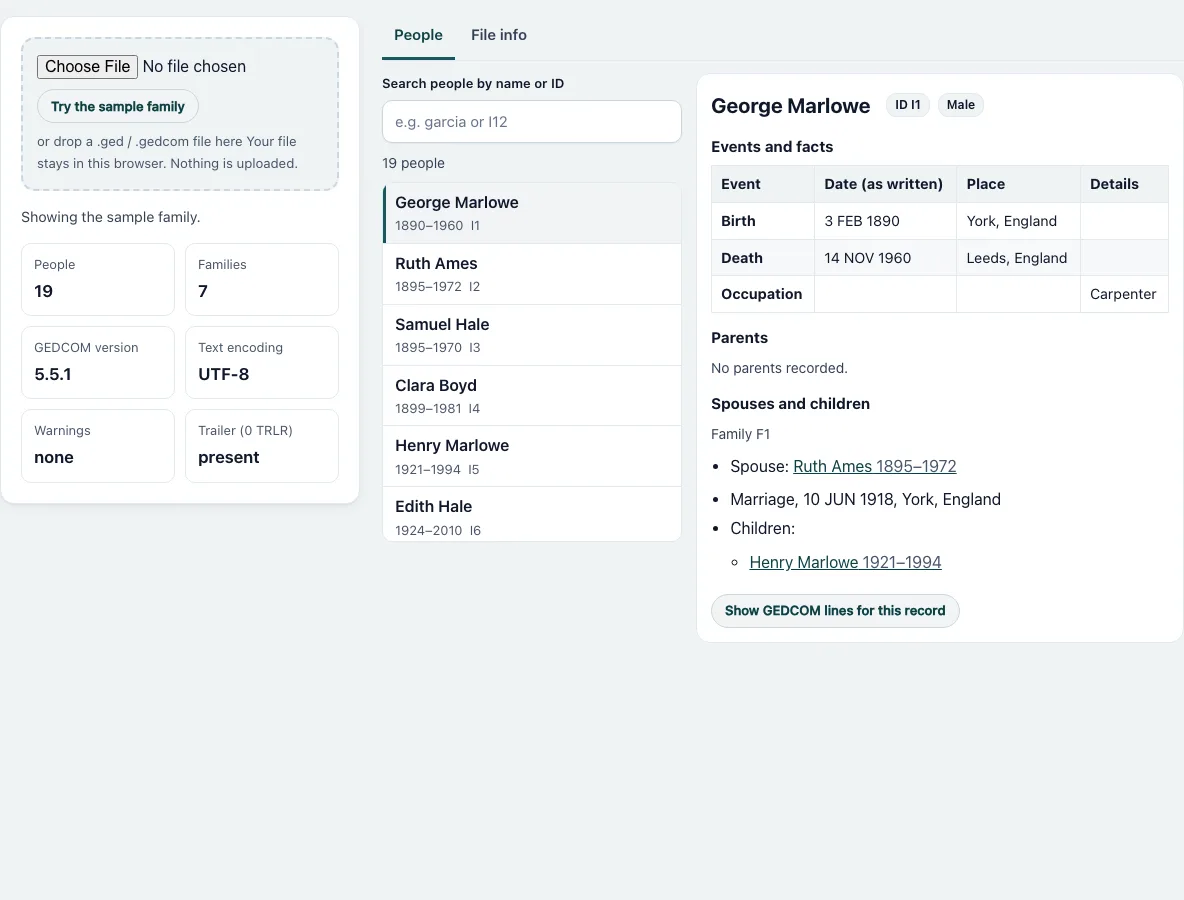
How to view a GEDCOM file
- Press “Choose File” and pick a .ged, .gedcom or .txt file, or drop the file onto the dashed box. To look around first, use “Try the sample family”; it is already open when the page loads.
- Read the tiles: People, Families, GEDCOM version, Text encoding, Warnings and Trailer (0 TRLR).
- Type in “Search people by name or ID”. Every word you type must appear in the name or the ID. Capitals and accents are ignored, so “jose” finds “José”.
- Click a row in the list. The card next to it shows the person’s ID, sex, names, events and facts, notes, sources, parents, spouses and children.
- Under “Parents” and “Spouses and children”, click a name to jump to that person.
- Press “Show GEDCOM lines for this record” to read the lines of that record exactly as they are in the file. Press “Hide GEDCOM lines” to close them.
- Open the “File info” tab for the header, the record types, the tags used and any warnings.
The list shows at most 200 people at a time. When more match, the line above the list says “Showing 200 of N. Refine the search to see others.” The “Date (as written)” column repeats the date text of the file, so “ABT 1850” stays “ABT 1850”.
What is a GEDCOM file?
GEDCOM is a plain text format for family tree data. Almost every genealogy program can export it and import it, which makes it the usual way to move a tree from one program to another. Each line has a level number, an optional ID between @ signs, a tag and a value. A person is a record that starts at level 0. This is the first person of the sample family, exactly as the viewer shows it under “Show GEDCOM lines for this record”:
0 @I1@ INDI
1 NAME George /Marlowe/
2 GIVN George
2 SURN Marlowe
1 SEX M
1 BIRT
2 DATE 3 FEB 1890
2 PLAC York, England
INDI marks an individual. The surname sits between slashes. Families are FAM records that point to people with HUSB, WIFE and CHIL lines. The viewer follows those pointers to fill “Parents” and “Spouses and children”. It reads 5.x files and 7.x files; the version comes from the GEDC and VERS lines of the header.
How do I open a .ged file?
A .ged file is text, so any text editor opens it, but you then see tags and IDs, not people. Genealogy programs import it, and so does this viewer. If accented letters look wrong in another program, the encoding is the usual cause. The viewer decides the encoding from a byte order mark or the byte pattern first and from the CHAR line of the header second. It reads UTF-8, UTF-16, ANSEL, ANSI (Windows-1252), ASCII and Mac Roman. In an ANSEL file the accent byte comes before its letter: the bytes E2 and 65 are read as é. The “Text encoding” tile shows what was used.
What do the warnings mean?
A warning means the file was read but something was not in the expected form: a line that is not a GEDCOM line, a level that jumps, a duplicated ID, or a file that declares UTF-8 but is not valid UTF-8 (it is then read as Windows-1252). Odd lines are kept, not dropped. The “File info” tab lists each warning with its line number. The viewer reports reading problems only; it does not check the family data itself.
Frequently asked questions
What is the difference between a .ged file and a .gedcom file?
None in content. Both are the same text format, and only the file name differs. The viewer accepts .ged, .gedcom and .txt.
Is my GEDCOM file uploaded anywhere?
No. The page reads the file with your browser and makes no network request for it. Family files often contain living people, so nothing is sent or stored.
Can it open a large GEDCOM file?
Yes. A generated file of 20,000 people opened in under a second in our test. The list shows 200 rows at a time, so searching stays fast too.
Why do accented letters look wrong?
Check the “Text encoding” tile. If a file says UTF-8 but contains other bytes, the viewer reads it as Windows-1252 and lists a warning. A file written in ANSEL is decoded as ANSEL.
Can I edit or save the file here?
No. This page only reads. To change the format or the encoding, use the Gedcom Converter.
Why do some events not appear in the table?
The table lists standard events and facts, and extension tags (starting with an underscore) only when they carry a date. Every other line of a record is under “Show GEDCOM lines for this record”.
Related tools
- Gedcom Validator: Use it to find broken links, missing records and other problems in the file.
- Gedcom Converter: Use it to change the GEDCOM version or the text encoding.
- Gedcom To Csv: Use it to get the people as spreadsheet rows.
- Gedcom To Excel: Use it to get an Excel workbook of the tree.
- Remove Living People From Gedcom: Use it before you share a file.
- Gedcom Splitter: Use it to cut a big file into smaller ones.
- Gedcom Merge: Use it to combine two files.
- Family Group Sheet: Use it to print one family on one page.
- Descendant Chart: Use it to draw the descendants of a person.
- Relationship Calculator: Use it to find how two people are related.