Relationship Chart
A family relationship chart you can change: choose their sex, full or half relatives and how many generations to show, then print it, save it as an image or copy it as CSV.
Recent
Your last 10 settings, saved only in this browser. Nothing is uploaded.
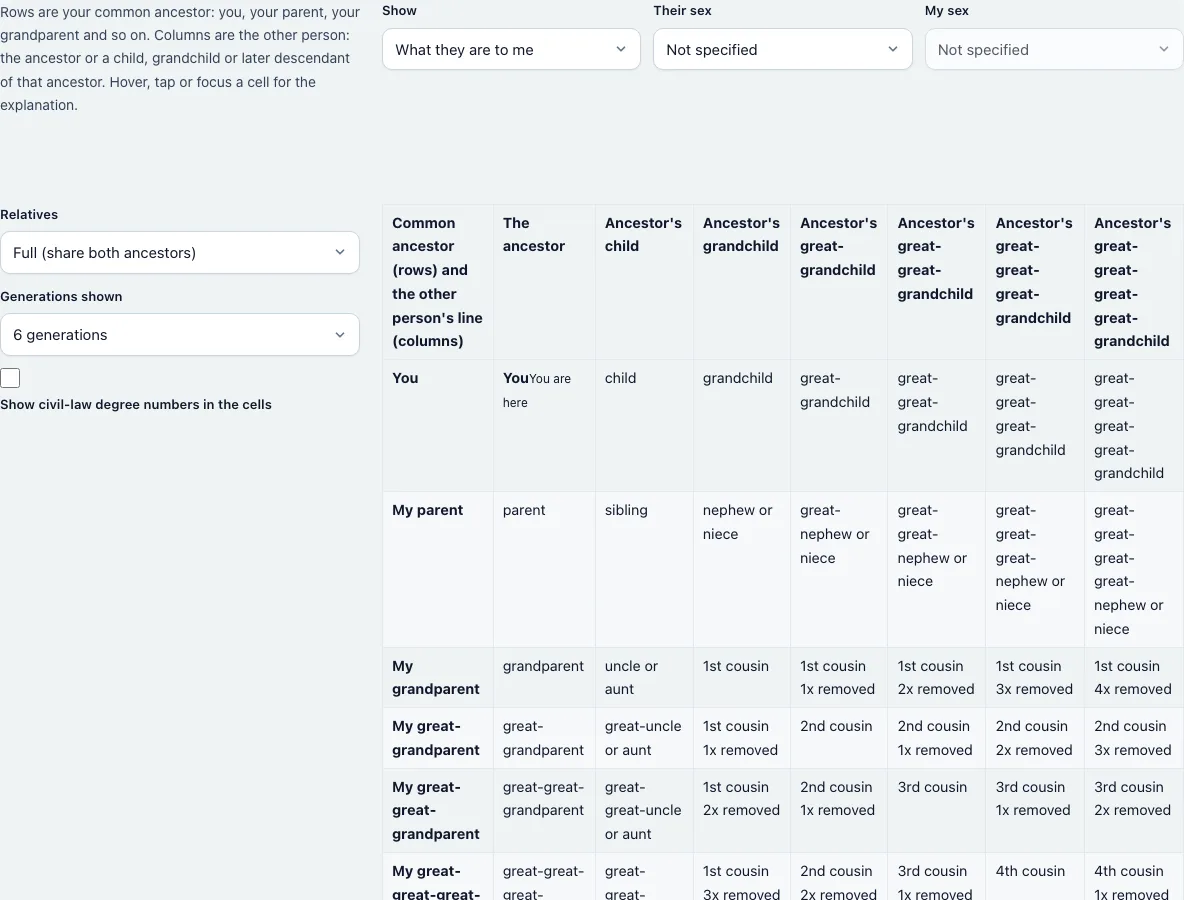
- Leave “Show” on “What they are to me” to read each relative from your side, or switch to “What I am to them” to read it from theirs.
- Choose “Their sex” to turn “uncle or aunt” into uncle or aunt, and “nephew or niece” into nephew or niece. When you read the chart from the other side, “My sex” is the one that is used.
- Under “Relatives”, choose Full for relatives who share both members of the ancestor couple, or Half for those who share only one person.
- Set “Generations shown” from 3 to 8. The default is 6.
- Tick “Show civil-law degree numbers in the cells” to see the degree under each name.
- Find your common ancestor in the left column. Your own row is “You”, then “My parent”, “My grandparent” and so on.
- Find the other person’s line along the top: the ancestor, the ancestor’s child, grandchild and so on. The cell where they cross is the answer.
- Hover over a cell, tap it, or move to it with the Tab key to read the explanation below the chart, with the degrees and the coefficient of relationship.
- Use “Print” for paper, “Download PNG” for an image or “Copy as CSV” for a spreadsheet.
How do you read a family relationship chart?
Start from the person you are comparing yourself with and ask who your closest shared ancestor is. Go down the left side to that ancestor, then across the top for how many generations the other person is below them. A cell in the “Ancestor’s child” column of the “My grandparent” row is your grandparent’s child: your uncle or aunt. In the “Ancestor’s grandchild” column of the same row you find your first cousin. Cells on the diagonal, where both numbers are equal, are siblings and cousins of the same generation as you.
What is a consanguinity chart?
It is another name for a chart of blood relationships. The “You” row lists your descendants: child, grandchild, great-grandchild. The first column lists your ancestors: parent, grandparent, great-grandparent. The rest of the grid holds collateral relatives, who descend from one of your ancestors but not from you.
How are cousins “removed” in the chart?
Move one column to the right of a cousin and the person is one generation younger, so a first cousin becomes a first cousin once removed. The cousin degree is the smaller of the two generation numbers minus one, and “removed” is the difference between them. In the “My great-grandparent” row, the column for the ancestor’s grandchild (two generations below) holds a first cousin once removed.
What do the degree numbers mean?
The civil-law degree adds the steps up to the ancestor and the steps down: siblings 2, uncle or aunt 3, first cousins 4. The canon-law degree counts only the longer line: siblings 1, uncle or aunt 2, first cousins 2. The explanation panel under the chart also shows the coefficient of relationship, the expected share of genes by descent: 50% for siblings, 25% for an uncle or aunt, 12.5% for first cousins. These are averages, not DNA results.
Frequently asked questions
What is the difference between this chart and a cousin chart?
A cousin chart covers only cousins by degree and removal. This chart also includes parents, grandparents, children, siblings, aunts, uncles, nieces and nephews.
What does “once removed” mean on a relationship chart?
It means the two people are one generation apart. Your first cousin’s child is your first cousin once removed.
Is a half relative shown differently?
Yes. Choose Half under “Relatives” to show half-siblings, half-uncles and half cousins. Their coefficient of relationship is half the full value.
Can I print the chart or save it?
Yes. The Print button prints the chart without the controls and the guide text. “Download PNG” saves an image and “Copy as CSV” copies a table you can paste into a spreadsheet. Nothing is uploaded.
Why does a cell say “uncle or aunt”?
The chart does not know their sex until you choose it under “Their sex”. Pick Male or Female and the cells change.
Why are some cells the same on both sides of the diagonal?
Cousins of equal generations are mirror images: your second cousin once removed is also related to you in the same way from their side. Uncles and nieces swap roles instead, which you can see by switching to “What I am to them”.
How far back does the chart go?
Up to eight generations from the common ancestor. Names follow the usual English pattern, such as great-great-grandparent and third cousin.
Use these pages for a single answer, a file of your own or the same words in other languages.
- Relationship Calculator: name the relationship for one pair of people.
- Cousin Chart: the cousins-only chart by degree and removal.
- Cousin Calculator: find the degree and removal of two cousins.
- First Cousin Once Removed: how this cousin relationship works.
- Kinship Terms: relative names in 20 languages.
- Inbreeding Coefficient Calculator: inbreeding for relatives who have children.
- How Many Ancestors Calculator: count ancestors by generation.
- Ahnentafel Number Calculator: number your ancestors.